Convert binary, bases and hashes online
Convert text to binary, calculate between number bases, convert Unix timestamps, encrypt with Caesar, generate MD5, SHA-1 and SHA-256 hashes and create or read barcodes.
Binary Code Converter
Convert text to binary (UTF-8, 8 bits per byte) and back, in real time.
About Converter & Encryption
Technical conversions and utilities: text to binary, number bases, Unix timestamps, Caesar cipher, MD5/SHA hashes and barcodes/QR codes.
A practical example
You downloaded an installer and the manufacturer’s site publishes its SHA-256 hash. To check a text or a license key, you paste the content into the hash tab, choose SHA-256 and compare the result, character by character, with the published value. If there is any difference, the content is not the same. Another common use: pasting the number 1760000000 into the timestamp converter to find the exact date something happened in a log.
How to use it
- Choose the tool.
- Type or paste the value.
- See the result right away.
- Copy it.
Limits and cautions
- MD5 and SHA-1 are not safe for protecting passwords; use SHA-256 or better for integrity.
- The Caesar cipher is educational and offers no real security.
A ferramenta em uma imagem
Os pontos de clique estão numerados. Toque na imagem para vê-la em tamanho original. As demais telas, passo a passo, estão no guia “Como funciona”.
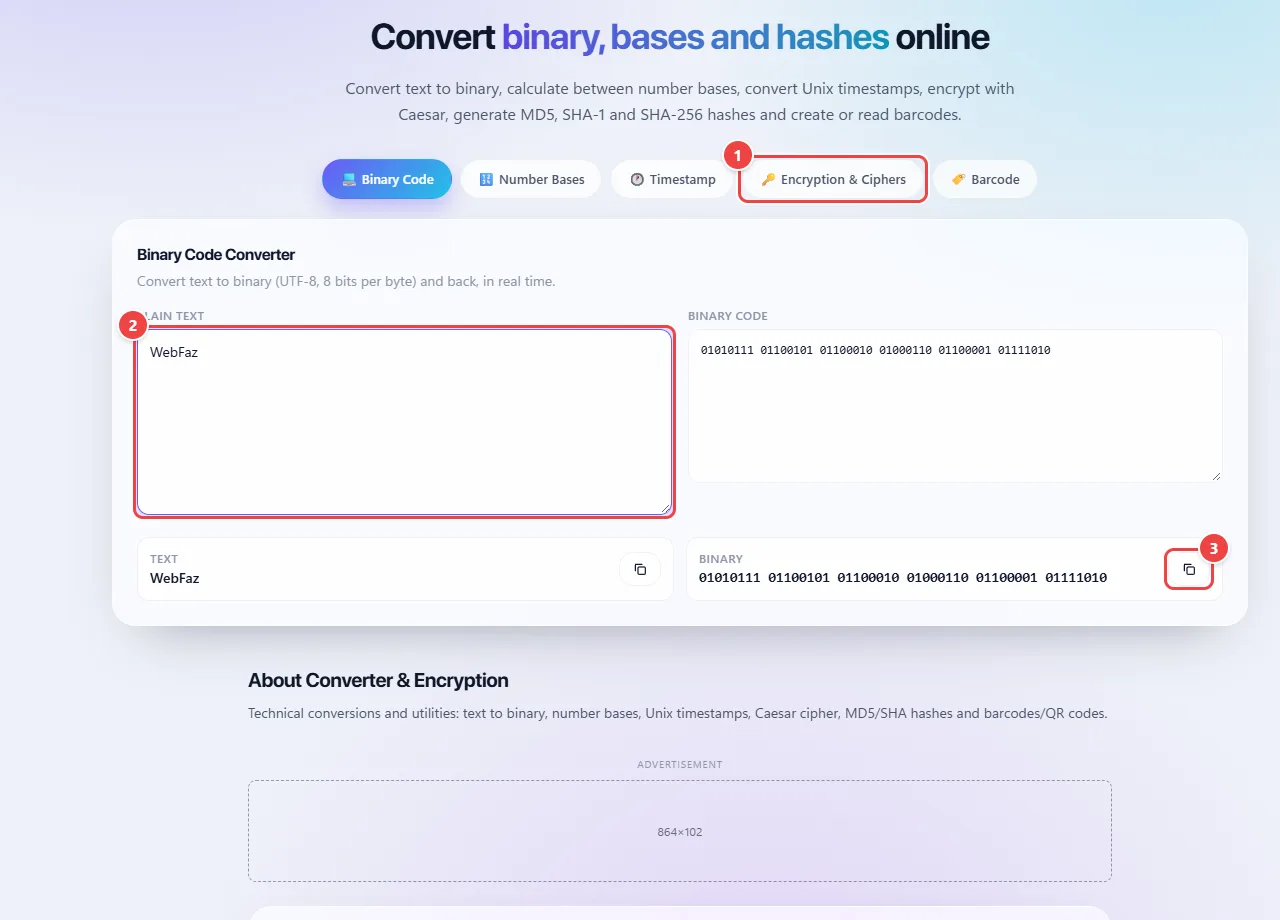
- Point 1: Choose the conversion: binary, number bases, Unix timestamp, ciphers and hashes, or barcode.
- Point 2: Type the text: the conversion happens in real time, in the browser.
- Point 3: Copy the result.
When to use it
- Studying or teaching how a text becomes binary, or how to change a number between bases (decimal, binary, hexadecimal).
- Calculating the SHA-256 hash of a text to check integrity, for example by comparing it with a published value.
- Converting a Unix timestamp into a readable date when analyzing logs and system data.
- Generating a barcode or QR code from a text.
Tips
- To check integrity, compare the hash character by character with the reference value: the smallest difference already means different content.
- A 10-digit timestamp is usually in seconds; a 13-digit one, in milliseconds.
- Use SHA-256 or better for integrity; MD5 and SHA-1 are here for compatibility with old systems.
What happens in your browser
SHA-1 and SHA-256 are calculated by the browser’s Web Crypto API (crypto.subtle.digest), the same security library used by payment sites and banks. MD5, which the browser does not offer because it is considered weak, is calculated by our own JavaScript implementation. The text is read as UTF-8 before the calculation.
A hash is a one-way function: it turns any input into a fixed-size sequence (64 hexadecimal characters in SHA-256). Changing a single character of the input changes the whole result, and there is no operation that “undoes” the hash. Whoever cracks passwords stored as hashes does not invert the calculation: they test millions of candidates until they find one that produces the same value.
Encryption is different: it is reversible by whoever has the key. The Caesar cipher, also present in the tool, swaps each letter for another at a fixed distance and serves to teach the concept, not to protect information.
Everything happens locally. The text you type is not sent to WebFaz. Even so, to be safe, do not paste real passwords into any website.
Read the full guide: real-world use cases, tips and limits →
Privacy: This tool runs entirely in your browser: your files and data are not sent to any WebFaz server. Learn more.
Perguntas frequentes
- Can I paste passwords here?
- The calculation runs in the browser and nothing is sent, but avoid pasting real passwords into any website, to be safe.
- Can a hash be reversed?
- Not directly; it is a one-way fingerprint.
- What is the difference between a hash and encryption?
- Encryption can be undone by whoever has the key. A hash is a one-way fingerprint: it is for checking whether something has changed, not for storing content and recovering it later.
- Why does MD5 still show up?
- It is still used in simple checks and legacy systems, but it is not safe against attacks and should not protect passwords.
- Does the Caesar cipher protect anything?
- No. It swaps each letter for another at a fixed distance and is broken in seconds; it is for teaching purposes.
- What is SHA-256?
- A hash algorithm from the SHA-2 family that produces a 256-bit fingerprint (64 hexadecimal characters) of any content. It is used to check file integrity, in digital signatures and in technologies such as blockchain.
- Can I use MD5 or SHA-1 to store passwords?
- No. They are too fast and have known weaknesses. For passwords, serious systems use dedicated, slow algorithms such as bcrypt, scrypt or Argon2, with a random value (salt) per user.
- How can I tell whether a number is seconds or milliseconds?
- By its length: a Unix timestamp with 10 digits is in seconds; with 13 digits, in milliseconds.
- Does this tool generate passwords?
- No.
- Is the generated barcode valid in stores?
- It follows the standard of the chosen format, but for commercial use (EAN/GTIN) the number must be registered with GS1.