Online color converter: HEX, RGB, HSL and OKLCH
Pick a color and see all formats instantly. Generate shade scales and harmonies, extract palettes from images, test contrast (WCAG and APCA) and simulate color blindness — all in the browser.
Selected color
Royal blueColor formats
Automatic conversion- HEX
#3867E8- RGB
rgb(56, 103, 232)- RGBA
rgba(56, 103, 232, 1)- HSL
hsl(224, 79%, 56%)- HSV / HSB
hsv(224, 76%, 91%)- CMYK · approximation, no print profile
cmyk(76%, 56%, 0%, 9%)- OKLCH · modern CSS
oklch(55.8% 0.202 265.2)- OKLab
oklab(55.8% -0.017 -0.202)- Display-P3 · wide-gamut screens
color(display-p3 0.264 0.399 0.878)
Shade scale (50–950)
Generated in OKLCH: lightness drops evenly, without the “washed out” or muddy tones that HSL produces. Your #3867E8 sits at the nearest step.
#F3F7FFBlack 19.5#E4EDFFBlack 17.9#CADBFFBlack 15.1#A8C4FFBlack 12.0#7DA5FFBlack 8.7#5283FFBlack 6.0#3867E8White 4.9#2149C1White 7.5#12339FWhite 10.5#061D7CWhite 14.3#020659White 17.9// tailwind.config.js
module.exports = {
theme: {
extend: {
colors: {
royal-blue: {
50: '#f3f7ff',
100: '#e4edff',
200: '#cadbff',
300: '#a8c4ff',
400: '#7da5ff',
500: '#5283ff',
600: '#3867e8',
700: '#2149c1',
800: '#12339f',
900: '#061d7c',
950: '#020659',
},
},
},
},
}
Color harmony
#3867E8#926D00Calculated by rotating the hue in OKLCH, so the colors have the same perceived lightness. Click one to work with it.
Contrast and legibility
APCA Lc 73 — Large or bold content text
The adjustment changes only the lightness (in OKLCH), preserving the hue of the selected color.
Color blindness simulator
Simulating the current color and its tetrad. Build a palette (2+ colors) to simulate yours. If two colors look alike on a row, do not rely on color alone to tell them apart.
Approximate simulation (Machado et al., 2009 model, full severity). It serves as a guide and does not replace testing with people.
Colors from an image
Upload a photo, logo or screenshot: the app finds the dominant colors (grouped in OKLab, by visual similarity) and lets you pick the color of any pixel.
CSS gradient
#3867E8background: linear-gradient(135deg, #3867E8, #A855F7); background: linear-gradient(in oklch 135deg, #3867E8, #A855F7);
My palette
Use “To palette” on the selected color (or “All to palette” on an image) to gather colors here. Then copy the CSS, save or share by link.
Color history
The colors you copy appear here (they stay only in this browser).
Pick and convert
Use the picker, the eyedropper, the lightness, chroma and hue controls — or paste any color (HEX, rgb(), hsl(), oklch()). All formats update together, with one click to copy.
Build the palette
Generate a 50 to 950 scale ready for Tailwind, harmonies that keep the lightness and palettes from photos. Gather the colors, save them in this browser or share by link.
Test accessibility
Check the contrast between text and background (AA and AAA, plus APCA), adjust the color until it passes and see how the palette looks to people with color blindness.
How do I convert and combine colors online with WebFaz Colors?
WebFaz Colors is a free color converter that runs in your browser: the colors and images you use are not sent to any server. The history and saved palettes stay only on this device.
Formats. Besides HEX, RGB, HSL, HSV and CMYK, the app shows OKLCH, OKLab and Display-P3, the modern CSS formats. CMYK is a simple mathematical approximation: for print, confirm with the color profile (ICC) used in printing.
Why OKLCH? In OKLCH, changing lightness does not change the “color” the eye perceives, and rotating the hue keeps the brightness similar. That is why the scales and harmonies here come out more uniform than those made in HSL. The gamut warning appears when a color exists only on wide-gamut screens (Display-P3): in that case, we show the closest one that fits in sRGB.
Contrast. WCAG 2.x calculates the ratio between luminances: 4.5:1 is the AA minimum for regular text, 7:1 for AAA, and 3:1 for large text and interface elements. APCA, proposed for WCAG 3, considers polarity (light text on a dark background or the reverse) and better estimates readability. Today, WCAG 2.x is still the criterion used for legal compliance.
Scale and export. The 50–950 scale can be copied as a Tailwind configuration (v3 or v4), CSS variables, SCSS or JSON. Your original shade sits at the nearest lightness step.
Colors from an image. Drag a photo, logo or screenshot: the app groups pixels by visual similarity and shows the dominant colors. Click the image to pick the color of a specific point. In supporting browsers (Chrome and Edge), the “Eyedropper” button picks the color from anywhere on the screen.
Color blindness. The simulator uses the Machado et al. (2009) model for protanopia, deuteranopia, tritanopia and achromatopsia. It is an approximation to guide design: if two colors get confused on any row, do not rely on color alone to tell them apart.
About Colors
Converts a color between HEX, RGB, HSL, CMYK and OKLCH, generates shade scales, harmonies and palettes from images, tests the contrast of text and background (WCAG and APCA) and simulates color blindness, all in the browser. It serves anyone who designs interfaces, writes CSS, builds a visual identity or checks accessibility.
What this color converter does
Besides converting, WebFaz Colors helps you build and validate a palette. The features that stand out:
OKLCH and gamut
Control lightness, chroma and hue, with a warning when the color exists only on wide-gamut screens (Display-P3).
50–950 scale
Generates the shades and exports to Tailwind (v3 and v4), CSS variables, SCSS or JSON.
WCAG and APCA contrast
See AA and AAA and adjust the color automatically until it passes.
Color blindness simulator
Protanopia, deuteranopia, tritanopia and achromatopsia applied to your palette.
Colors from an image
Extracts the dominant colors of a photo, logo or screenshot and picks the color of any pixel.
Pick from screen and mini window
In Chrome and Edge, pick the color from any app and leave a floating window with the result.
Palettes and link
Build, save in this browser and share a palette by link, with no sign-up.
How to use it
- Pick the color with the picker, the screen eyedropper or by pasting any format (HEX, rgb(), hsl(), oklch()).
- Copy the format you need, or generate the shade scale and the harmony from the color.
- Test the contrast against the background color and use “Adjust” if it does not pass.
- Gather the colors in a palette, save it in this browser or share it by link.
Limits and cautions
- CMYK is a mathematical approximation, with no color profile (ICC): for print, confirm with a color proof.
- The screen eyedropper and the mini window work in Chrome, Edge and Opera, on a computer. In other browsers, paste a screenshot with Ctrl+V in the image section.
- The color blindness simulator is an approximation: it serves as a guide and does not replace testing with people.
A ferramenta em uma imagem
Os pontos de clique estão numerados. Toque na imagem para vê-la em tamanho original. As demais telas, passo a passo, estão no guia “Como funciona”.
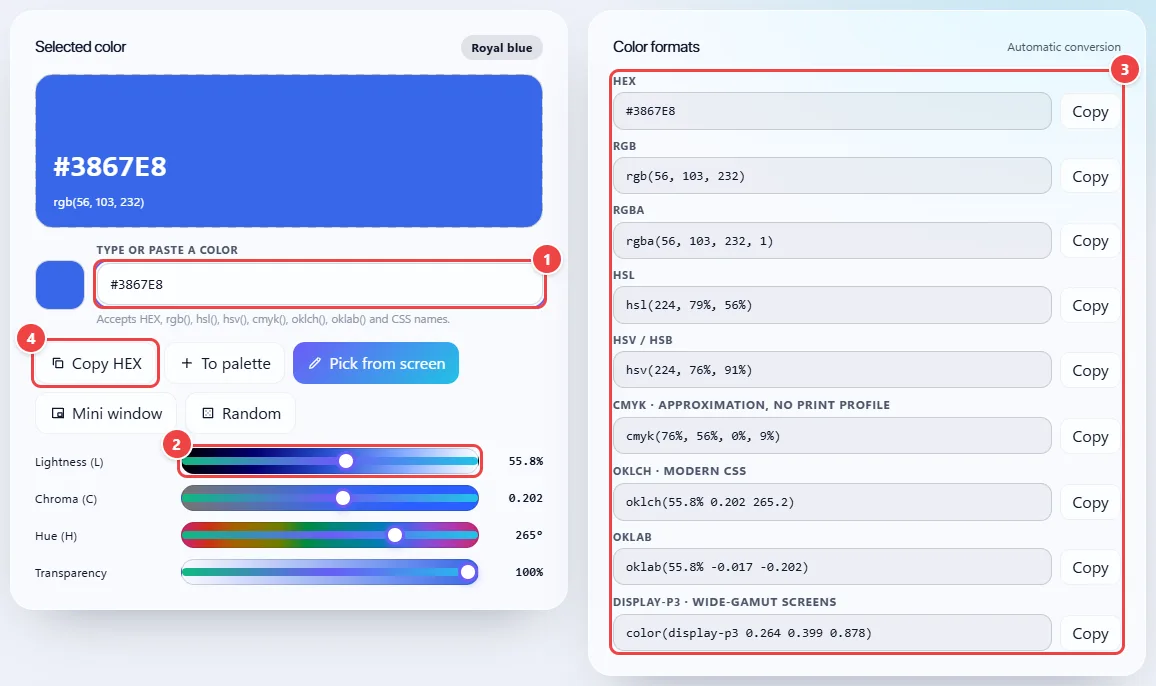
- Point 1: Paste or type the color in any format: HEX, rgb(), hsl(), hsv(), cmyk(), oklch(), oklab() or a name like “coral”.
- Point 2: Adjust the lightness, chroma and hue in OKLCH. Transparency generates RGBA and HEX with alpha.
- Point 3: All the formats update together. Click “Copy” on the one your code asks for.
- Point 4: Copy HEX copies the current color straight away and stores it in the history.
Read the full guide: real-world use cases, tips and limits →
Privacy: This tool runs entirely in your browser: your files and data are not sent to any WebFaz server. Learn more.
Perguntas frequentes
- Are my colors and images sent to any server?
- No. Everything is calculated in the browser; history and palettes stay only on this device.
- What is OKLCH and why use it?
- It is a modern CSS format in which changing lightness or hue does not distort the rest of the color. Scales and harmonies made in it come out more uniform than in HSL.
- What contrast should I reach?
- For regular text, WCAG AA asks for 4.5:1 (AAA, 7:1). For large text and interface elements, 3:1.
- Can I pick a color from another open program?
- Yes, in Chrome, Edge and Opera: use “Pick from screen”. In other browsers, take a screenshot (Win+Shift+S) and paste it with Ctrl+V in the image section.