Free finance calculators: percentage, interest and pricing
Calculate percentages and discounts, simple and compound interest with monthly deposits, and the selling price from a markup. Pick your currency and copy any result with one click.
📊 Percentage
📈 Simple interest
🚀 Compound interest
🏷️ Pricing (markup)
Set the selling price by adding a percentage (markup) on top of the cost. Note: this is not the margin on the selling price; for a 40% margin on the sale, use a markup of 66.7%.
About Finance Calculators
Four quick financial calculators: percentage and discount, simple interest, compound interest with monthly deposits and the selling price from a markup.
What these calculators do
Everyday money math, with no sign-up and no spreadsheet:
Percentage and discount
Find what a percentage of a number is, or apply an increase or a discount to a price and see the final value.
Simple and compound interest
Compare how an amount grows over time, with a monthly rate, a number of months and, for compound interest, a monthly deposit.
Selling price by markup
Add a percentage on top of your cost and see the gross profit and the suggested selling price.
Several currencies
Pick USD, EUR, GBP, CAD or AUD. Results follow the number format of the currency.
A practical example
A freelancer bought supplies for $50 and wants to sell the finished piece with a 40% markup. In the pricing calculator the gross profit appears as $20.00 and the suggested price as $70.00. To plan a savings goal, the same person tries the compound interest card with $1,000 up front, $200 a month, 1% a month for 24 months.
How to use it
- Choose the currency.
- Fill in the values on the calculator you need.
- Read the result, updated as you type.
- Copy the result with one click.
Limits and cautions
- The interest calculations are simplified and do not include taxes, fees or the rules of a specific bank or loan.
- Results are estimates for planning, not financial advice.
A ferramenta em uma imagem
Os pontos de clique estão numerados. Toque na imagem para vê-la em tamanho original. As demais telas, passo a passo, estão no guia “Como funciona”.
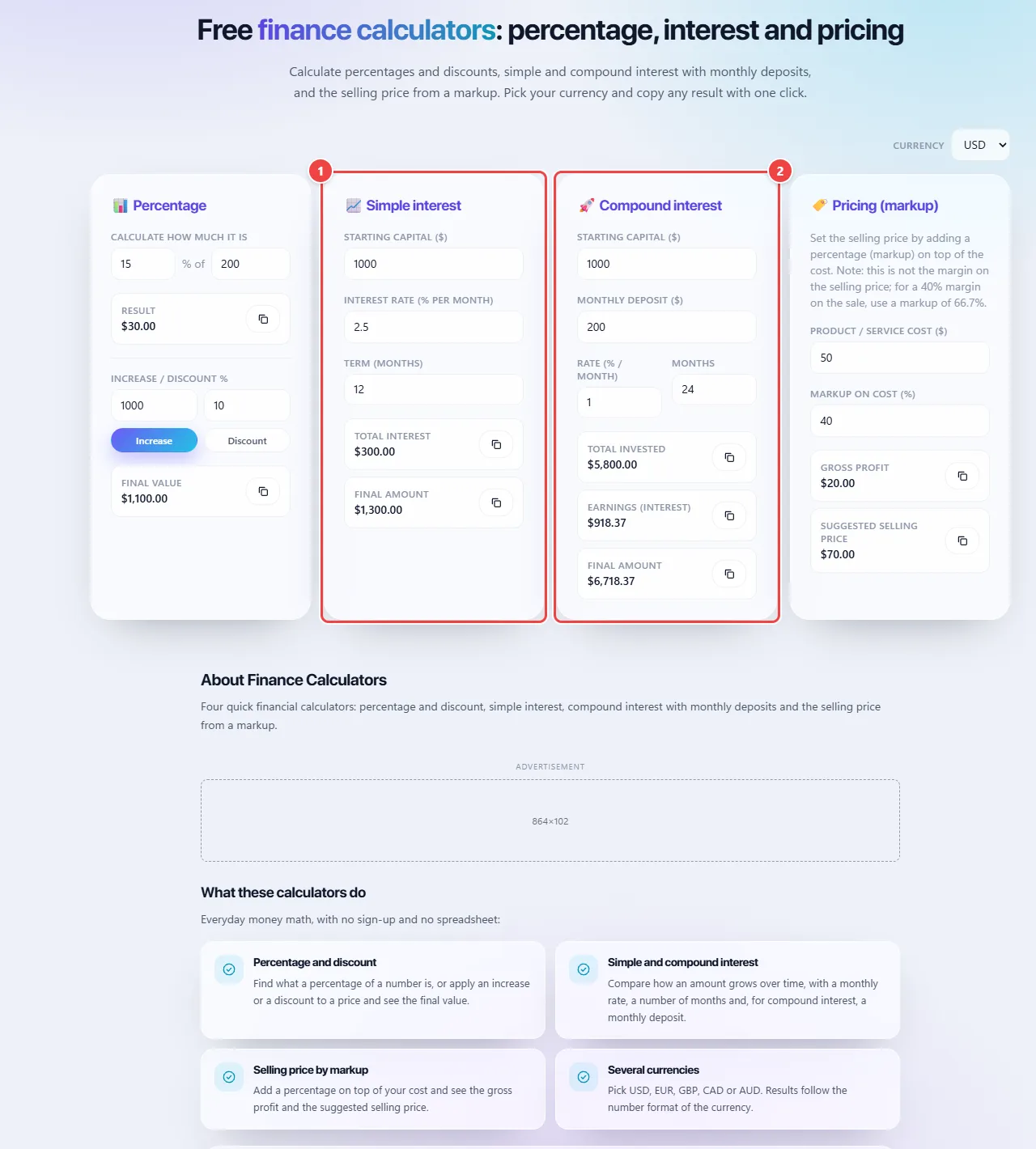
- Point 1: Simple interest applies only to the initial amount: enter capital, rate and term.
- Point 2: Compound interest applies to the amount already increased, with an optional monthly deposit. Compare the two results.
When to use it
- Working out a discount or a price increase.
- Comparing simple and compound interest for a loan or a savings plan.
- Setting the selling price of a product or service from its cost.
- Estimating how much a monthly deposit will grow in a year or two.
Tips
- Include every cost (materials, fees, your time) before applying the markup.
- Use the monthly rate for monthly periods; convert an annual rate before typing it.
- Copy the results into your spreadsheet or message with the copy button.
What happens in your browser
Every calculation is made in JavaScript in your browser, as you type. Nothing is sent to a server.
Simple interest is capital × rate × time. Compound interest is applied month by month on the balance, adding the deposit before the interest of each month.
The currency changes only the symbol and the number formatting (using the browser’s standard number formatting); no exchange rate is applied.
Read the full guide: real-world use cases, tips and limits →
Privacy: This tool runs entirely in your browser: your files and data are not sent to any WebFaz server. Learn more.
Perguntas frequentes
- Is my data saved?
- No. The values you type stay in your browser and are not sent or stored by WebFaz.
- What is the difference between simple and compound interest?
- With simple interest the rate always applies to the initial amount. With compound interest it applies to the amount already increased by earlier interest, so it grows faster.
- What is the difference between markup and margin?
- Markup is a percentage added on top of the cost. Margin is the share of the selling price that is profit. For a 40% margin on the selling price you need a markup of about 66.7% on the cost.
- Can I use another currency?
- Yes. The calculators only change the symbol and the number format; the math is the same in any currency.