Make your 3x4 photo online, with AI
The AI frames the face in the 3x4 format, improves the light on the skin and cleans up the background with soft edges. Adjust brightness, saturation and sharpness and download the photo or the sheet ready to print on 10x15 or A4. Free, no install and without sending your photo.
Download
Photo 3 × 4 cm
Print sheet
About 3x4 Photo
Makes 3x4 cm photos for documents, resumes, badges and registrations from an ordinary photo. The AI finds the face and frames it in the 3x4 format, improves the light on the skin, cleans up the background with soft edges and builds the sheet ready to print on 10x15 cm or A4 paper.
What makes 3x4 Photo different
Instead of cropping by eye, the AI measures the face and applies the document framing. What it does:
Framing by the face
Face at the size of an ID photo, eyes at the right height and head upright, with fine adjustment by dragging or by the controls.
Mask on the face
A 478-point AI outline to light only the skin, with a soft transition and balance between the sides of the face.
Mask on the background
The person-background separation is refined by the photo itself, to respect strands of hair, and the edge has an adjustable transition.
Sheet ready to print
10 × 15 cm or A4 sheet with several photos and cut lines, already at the right resolution, with adjustable margin and spacing between photos.
Quality warnings
Before printing, the app warns about closed eyes, a turned face, an open mouth, strong shadow, a dark or blown-out photo, an out-of-focus face, low resolution and a dark background.
Continue in Studio
For more features, open the photo in Studio and come back with the edited version.
How to use it
- Choose or drop a front-facing photo, with the face clearly visible and good light, or take one on the spot with the Use the camera button. The first time, the app downloads the AI models (about 8 MB).
- Check the framing: you can drag the photo, change the face size, the position and straighten the head. Turn on the Guides to see where the face and the eye line fall.
- Adjust the face lighting, choose the background (corrected original, white, light gray or light blue) and make small adjustments to brightness, saturation, atmosphere, clarity and sharpness.
- Download the 3x4 photo as a JPG (300 or 600 dpi), as an A4 PDF at real size, or the sheet with several photos to print. On the sheet you can change the margin and the space between the photos.
Limits and cautions
- The app does not know which document you will make: each one has its own rules for background, face size and expression. Check your document’s requirements before printing.
- Separating the person from the background is done by AI and can get it wrong with very voluminous hair, glasses or backgrounds similar to the clothes. Use View masks to check and raise the edge transition if needed.
- It works best with a front-facing photo, a single face and the whole head in view. If the face is very close to the edge, the ideal framing does not fit and the face comes out larger.
- For curves, filters, retouching and other features, use the Edit photo in the Studio app button.
- The 3 × 4 cm format and the 10 × 15 cm and A4 sheets are the Brazilian standard. Other countries ask for other photo sizes (for example 2 × 2 inches or 35 × 45 mm): check the size your document requires.
The tool in one image
The click points are numbered. Tap the image to see it at full size. The other screens, step by step, are in the “How it works” guide.
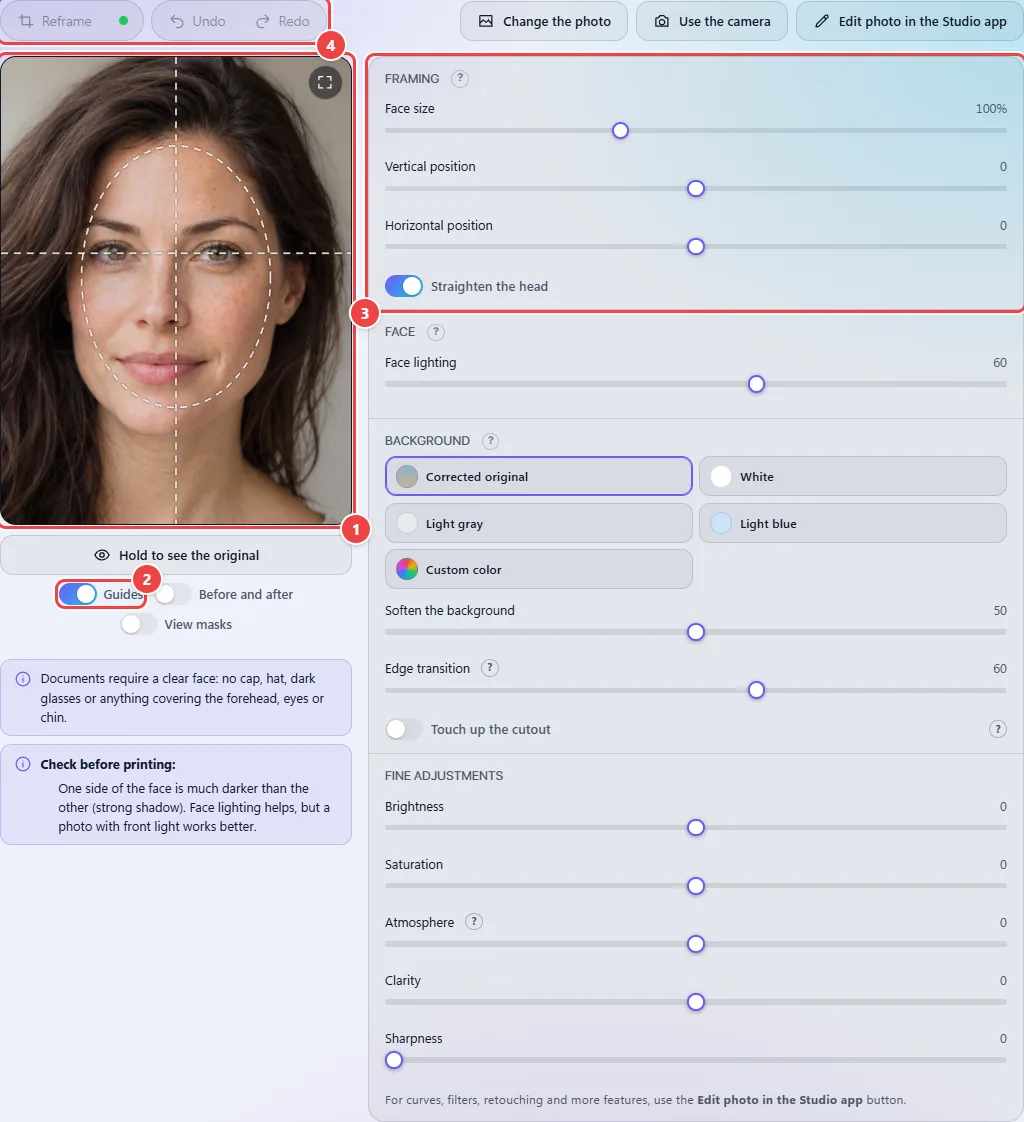
- Point 1: The photo already comes framed in the 3x4 format, with the face at document size and the eyes at the right height. Drag the photo to move it; click it and use the mouse wheel (or two fingers on a phone) to zoom in on the face.
- Point 2: Guides: show the face outline and the eye line over the photo, so you can check the framing.
- Point 3: Face size, vertical and horizontal position and Straighten the head. Double-click a control to return to its initial value.
- Point 4: Reframe goes back to the automatic framing. The AI is ready when the circle turns green.
Read the full guide: real-world use cases, tips and limits →
Privacy: 3x4 Photo runs entirely in your browser and no photo is sent to a server. To find the face and separate the person from the background, it downloads Google AI models once — MediaPipe, about 8 MB, served by jsDelivr and Google Cloud Storage. Only those files are downloaded; each one is checked with SHA-256 and stored in the browser. You can turn it off at any time with the "AI" button; without it the app uses a simple detection, which is less precise. Learn more.
Frequently asked questions
- Is my photo sent to a server?
- No. The photo is opened and edited on your device. What is downloaded, once, are the public Google AI models (about 8 MB), checked with SHA-256 and stored in the browser. You can check it in Network (F12): no photo leaves.
- What is the size of a 3x4 photo?
- 3 cm wide by 4 cm tall. At 300 dpi that is 354 × 472 pixels; at 600 dpi, 709 × 945 pixels. The file already comes out with the resolution recorded, so it prints at the right size.
- Can I replace the background with white?
- Yes: under Background, choose White, Light gray or Light blue. With Corrected original, the background is kept, but it loses clarity and texture and gets more even light.
- How does the lighting improvement work?
- A mask along the face outline, made from the points the AI detects, lifts what is dark, holds back what is blown out and balances the light between the left and right sides. The mask edge is soft, with no visible cut.
- How many photos fit on the sheet?
- With a 3 mm margin and 1 mm between the photos, nine fit on 10 × 15 cm paper and up to forty-two on A4, with a thin line to cut along. You can change the sheet margin and the space between the photos, and the number of photos that fit changes with them.
- Can I take the photo with my camera?
- Yes. Use the Use the camera button: on a secure page (https) it opens a window with an outline to place your face and a 3-second timer; otherwise it opens your phone’s camera app. The photo never leaves your device.