Create your WhatsApp link with a ready-made message
Generate a wa.me link with a custom number and message, copy it, test it and turn it into a QR code on the spot. Nothing is sent to a server.
About WhatsApp Link
Creates a wa.me link that opens a WhatsApp conversation with the number and a ready-made message, ideal for a social media bio or a website.
A practical example
A nail technician wants a “Book an appointment” button in her Instagram bio. She enters her number with the country code, writes the message “Hello! I would like to book a nail appointment” and copies the generated link. Anyone who clicks it opens her WhatsApp with the message ready, and she does not need to ask the client to save her contact.
How to use it
- Enter the number with the country code.
- Write the first message (optional).
- Copy the link or test it right away.
- Create the matching QR code, if you like.
Limits and cautions
- The number must be in international format (country code + number, with no spaces or symbols).
A ferramenta em uma imagem
Os pontos de clique estão numerados. Toque na imagem para vê-la em tamanho original. As demais telas, passo a passo, estão no guia “Como funciona”.
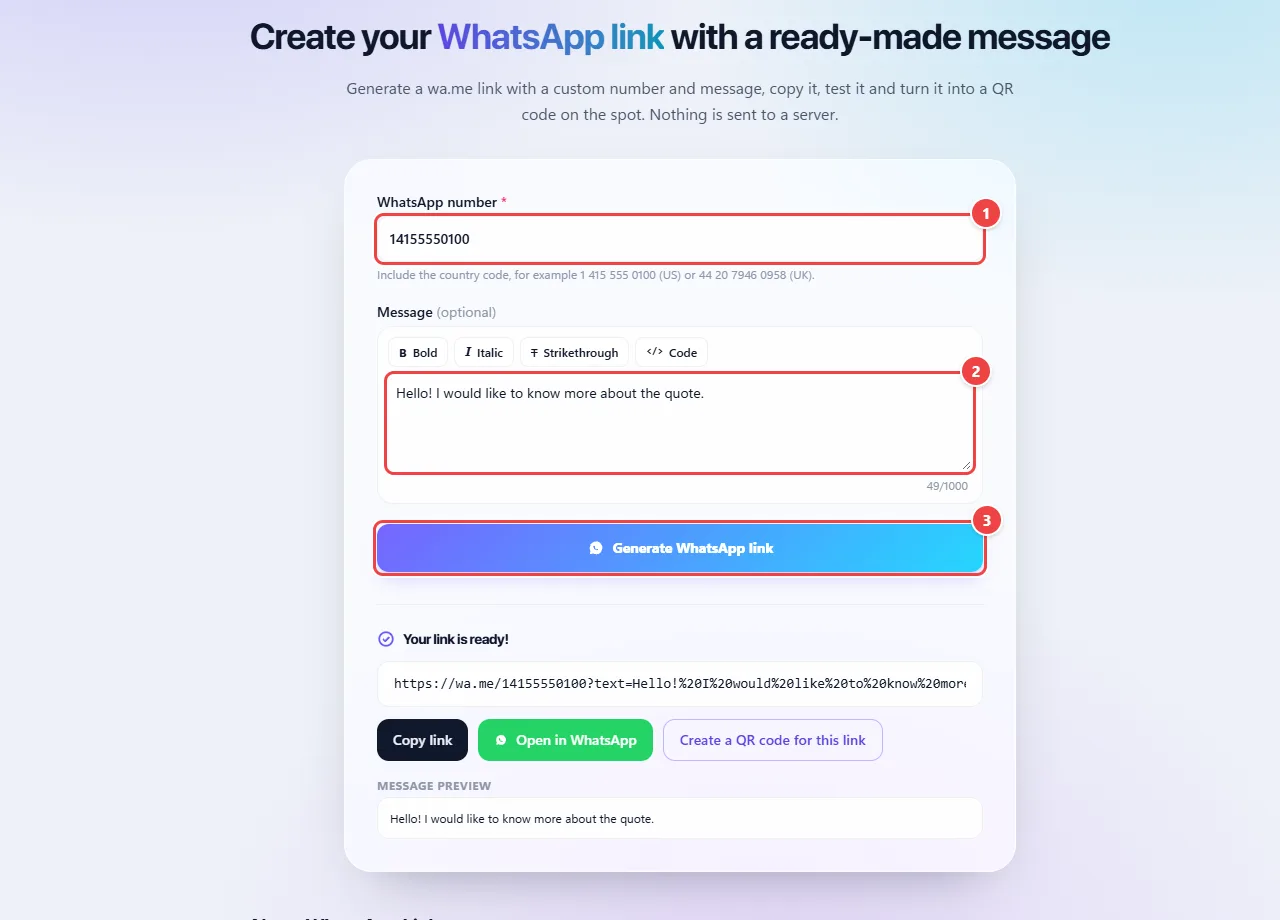
- Point 1: Type the number with country and area code. It stays only in your browser.
- Point 2: Write the message that will already appear ready for whoever clicks. The buttons above apply bold, italic, strikethrough and code.
- Point 3: Generate WhatsApp link creates the wa.me address, which you can copy, test or turn into a QR Code.
When to use it
- Putting a “Contact me” button in your Instagram bio, on your website or in your email signature.
- Promoting a service on cards, flyers and shop windows, using the QR code of the same link.
- Opening the conversation already with the subject, such as “I would like a quote” or “I came from the website”, so you know where the customer came from.
Tips
- Write a short first message that explains the reason for the contact; messages that are too long put people off.
- Use the full number, with the country code, and no spaces or symbols.
- Test the link on your phone and on your computer before sharing it.
What happens in your browser
The generated link uses WhatsApp’s public format (wa.me), in which the number, digits only and with the country code, goes in the address, and the message is encoded as a parameter. Whoever opens the link sees the conversation with the text already filled in, ready to send.
The message goes through URL encoding: accents, spaces and line breaks become safe codes. That is why the link has characters such as %20, and that is expected.
Nothing is stored or sent to WebFaz: the link is built in your browser. The QR code for the same link is also generated locally.
Read the full guide: real-world use cases, tips and limits →
Privacy: This tool runs entirely in your browser: your files and data are not sent to any WebFaz server. Learn more.
Perguntas frequentes
- Do I need WhatsApp Business?
- No, the link works with regular WhatsApp and Business.
- Is the number sent to a server?
- No. The link is built in your browser.
- Can I use bold and italics in the message?
- Yes, with WhatsApp’s own syntax: *bold*, _italic_, ~strikethrough~ and ```code```. The page shows a preview of how it will look.
- Does the link expire?
- No. It keeps working as long as the number exists on WhatsApp.
- Does it work on a computer?
- Yes. On a computer it opens WhatsApp Web or the desktop app, if it is installed.
- Do I need the country code?
- Yes. The number starts with the country code (1 for the US and Canada, 44 for the UK, 55 for Brazil…), followed by the number, with no spaces, parentheses or dashes.
- Does the person need to have my number saved?
- No. The link opens a conversation with the number you entered, even if it is not in their contacts.
- Can I create a QR code for the link?
- Yes, useful for posters, cards and shop windows.