Create and play puzzles on any theme
Word searches and crosswords. Play ready themes, build your own in the editor, or ask the AI to generate a brand-new puzzle — then print it on an A4 sheet.
Choose a puzzle to play
Ready themes, games you created, or ask the AI to generate a brand-new puzzle on any subject.
Create an instant game with AI
15 of 15 generations left todayThe theme you type is sent to our server, which asks the AI (Gemini) to create the words — it is not saved.
Gallery of ready themes
Movie Classics
Popcorn Weekly
General Knowledge
Mind Challenge
80s & 90s Nostalgia
Time Tunnel
World of Games
Geek Universe
Nature & Environment
Planet Earth
How does WebFaz Puzzles work?
Generate and play word searches and crosswords — ready themes, created by you or generated by AI.
1. Choose a theme. In the Gallery, play a ready theme or ask the AI to generate a brand-new puzzle by typing any subject.
2. Play without seeing the answer. In the word search, drag across the grid to select a word. In the crossword, type letter by letter.
3. Create your own. On the “Create Puzzle” tab, choose the type, add your words and save to play or print.
4. Print on paper. On the “Print / PDF” tab, see the version ready for an A4 sheet, with an upside-down answer key at the bottom, and use “Print” or “Save PDF” (downloads the A4 file directly).
About the AI. The “Generate and play” button sends the theme you typed to our server, which asks Gemini to create the words — the theme is not saved. There is a daily limit of generations per browser, shown on screen.
About Puzzles
Generates word searches and crosswords with ready themes, to play on screen or print as a PDF for activities and leisure.
What this puzzle maker does
From theme to paper: you choose, build or ask for a game and print it on an A4 sheet. The features that stand out:
A game on any theme with AI
Type a subject (such as “Astronomy” or “Football”) and generate a word search or crossword. It is optional, only the theme you type is sent, and there is a limit of 15 games per day in this browser. Review the words before using them.
Build your own with your words and clues
In the editor, set the title and subtitle, the game type, the grid size, the directions (horizontal and vertical, diagonals and reversed) and the list of words and clues, with a preview of the answer key.
Magazine-style A4 sheet, with answer key
The printout comes out on an A4 sheet with the look of a newsstand puzzle magazine, with the answer key for you.
Play on screen without seeing the answers
Save and play on the page itself, with the answers out of sight.
Word searches and crosswords
Two game types: in the word search, the words are hidden in a grid; in the crossword, the words fit together by their common letters and the clues are numbered.
Gallery of ready themes
Start with a ready theme and play right away, with no sign-up.
A practical example
A teacher wants an activity about animals for her third-grade class. She chooses the word search, the theme “animals”, and generates the sheet. She opens the editor to swap two words and prints it as a PDF, with the word list alongside.
How to use it
- Choose the puzzle type and the theme.
- Play on screen or open the editor to customize.
- Generate the PDF to print, if you prefer.
Limits and cautions
- AI-generated themes are optional and may contain mistakes; review them before using in the classroom.
A ferramenta em uma imagem
Os pontos de clique estão numerados. Toque na imagem para vê-la em tamanho original. As demais telas, passo a passo, estão no guia “Como funciona”.
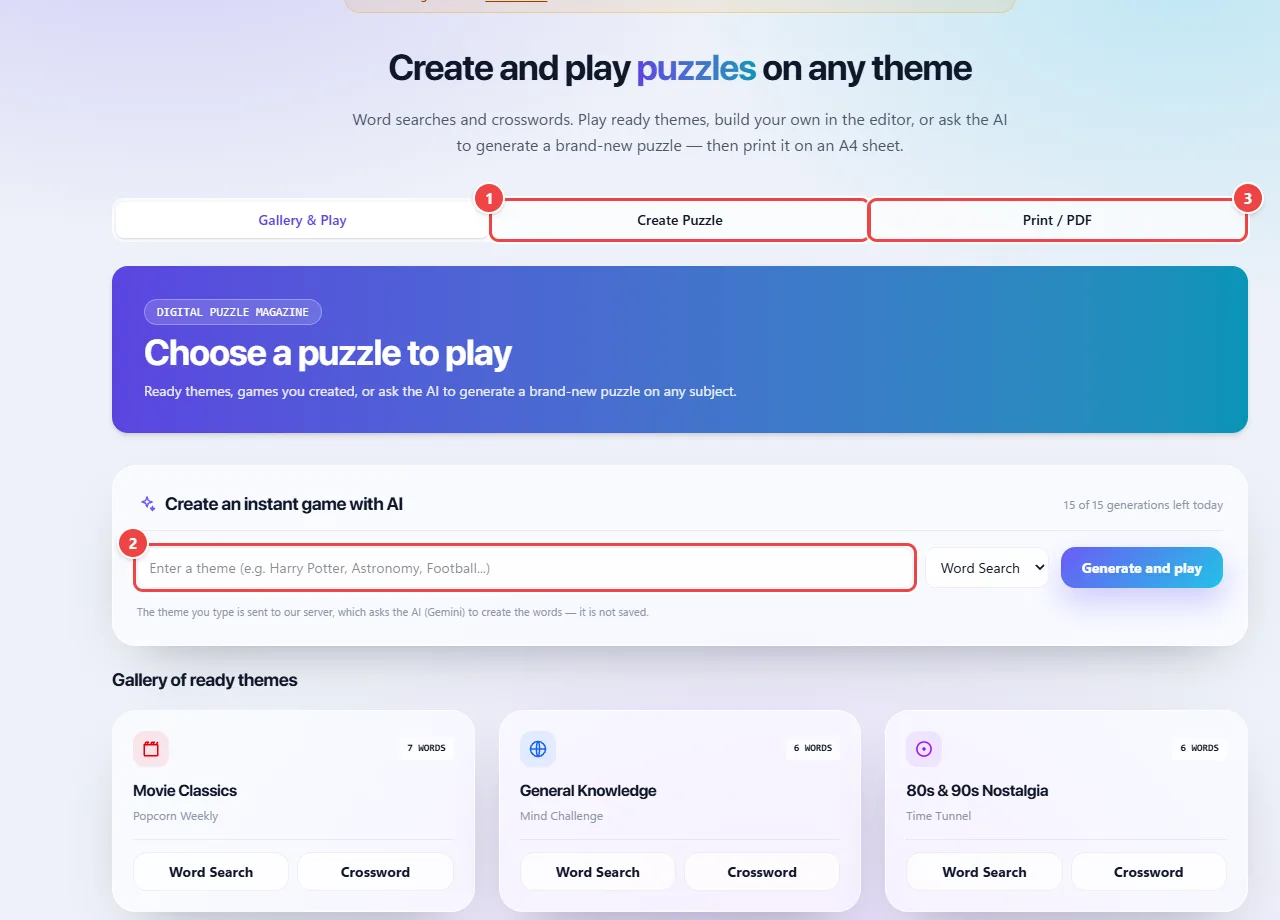
- Point 1: Create your word search or crossword in the editor.
- Point 2: Or type a topic and generate a game with AI (optional: only the topic you type is sent).
- Point 3: Print on an A4 sheet or save as PDF.
When to use it
- Review activities for the classroom, with school themes.
- Puzzles for parties, trips or to keep children busy.
- Printed giveaways for events, with words from the brand or the theme.
Tips
- Use words without confusing accents and of varied lengths for a more balanced word search.
- Review the list before printing, especially for AI-generated themes.
- For classes, print a copy with the answers for yourself.
What happens in your browser
The word search places the list’s words in a grid, in different directions, and fills the rest with letters. The crossword fits the words together by their common letters and numbers the clues.
Ready themes bring prepared lists. AI-generated themes are optional and may contain mistakes, so they should be reviewed before use in the classroom.
The PDF for printing is generated in the browser. Puzzles played on screen and those you edit are not sent to WebFaz.
Read the full guide: real-world use cases, tips and limits →
Privacy: It works locally by default. Only if you turn on the AI feature is the theme you type (a word or short phrase, never the game itself) sent to Google Gemini. Ready themes and the editor work 100% in the browser. Only the “Generate with AI” button sends the theme to our server, which passes it on to Gemini — the theme is not saved. Learn more.
Perguntas frequentes
- Can I create my own theme?
- Yes, in the editor you define the words.
- Can I print for a class?
- Yes, the PDF is generated for printing.
- What is the difference between a word search and a crossword?
- In a word search, the words are hidden in a grid of letters. In a crossword, you find the words from clues and write them crossing each other.
- Are AI themes reliable?
- They are an optional help and can be wrong. Review them before use.
- Do I need to sign up?
- No.