World clock, stopwatch and timer online
See the time in several cities, use a customizable countdown, stopwatch, timer and Pomodoro to organize cycles of focus and breaks. Free and right in the browser, with no sign-up.
Wednesday, October 21, 2026
Countdown
Target: 10/22/2026, 5:50:02 AM
00:00:00.00
25:00
Cycle 1 of 4
10:00
About Clock
Brings together a countdown with animation, sound and redirect, Pomodoro (cycles of focus and breaks), stopwatch, timer and world clock in one place.
What makes the Clock different
Besides the current time, the Clock brings a countdown that is set up like an event page and a Pomodoro that follows you into other windows. The features that stand out:
Countdown with an animated background
In full screen, the countdown can have as its backdrop a moving background (bubbles, waves, rings and others), a Backgrounds background or an image of your own.
Link to share the countdown
One click copies a link with title, date, messages, animations and sounds. Each person who opens it sees the countdown in their own time zone. The background image is not included in the link.
Redirect when it reaches zero
When it ends, the countdown can take you to a link (YouTube, Instagram, a sales page) or to another tab of the Clock. Whoever opens a shared link is warned and can cancel.
Messages, animations and sounds your way
Event title, message during the countdown, message when finished, eight animations (confetti, fireworks, neon and others) and four sounds, combinable.
Pomodoro in a floating window
Open the Pomodoro in a small window that stays on top of other programs. Focus, short break, long break and cycles until the long break are adjustable.
Current time, stopwatch and timer
Digital or analog clock with time zones of several cities, in full screen, plus a stopwatch and a timer.
A practical example
You are going to do a livestream at 8 pm and want a countdown on screen. You create a countdown to 8 pm, turn on the sound at zero and choose to open the stream’s link at the end. You share the countdown link with guests: when they open it, each person sees the same remaining time and, at zero, is taken to the livestream link.
How to use it
- Choose the tab: Current time, Countdown, Stopwatch, Pomodoro or Timer.
- Set time zones, target date or durations.
- Start and follow on screen, including in full screen.
- In the countdown, click “Edit” to open the hidden options: title, messages during and at the end of the countdown, animations, sounds, image or animated background for full screen and redirect to a link.
Limits and cautions
- The page needs to stay open: browsers may reduce the accuracy of background tabs; keep the tab visible for critical countdowns.
A ferramenta em uma imagem
Os pontos de clique estão numerados. Toque na imagem para vê-la em tamanho original. As demais telas, passo a passo, estão no guia “Como funciona”.
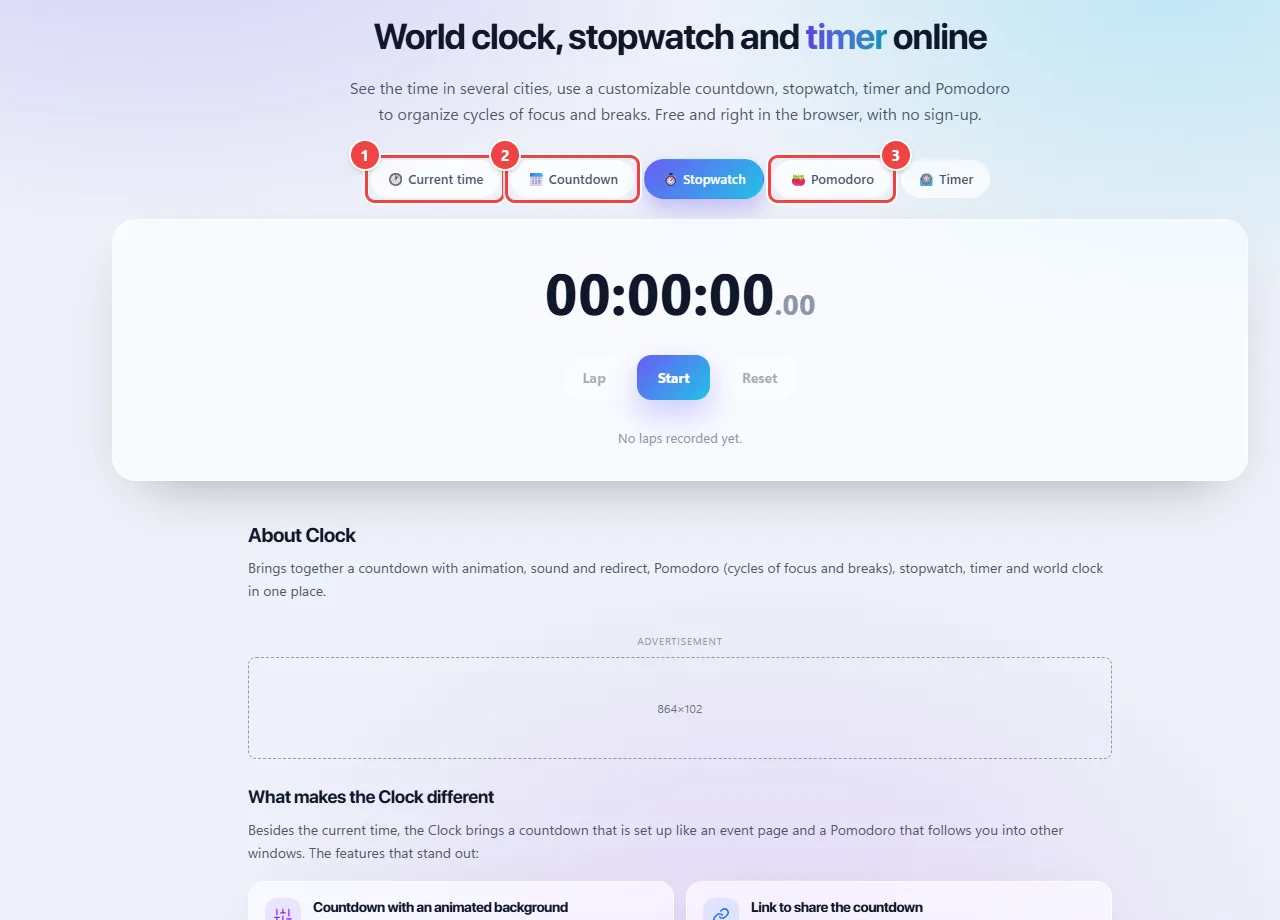
- Point 1: Current time: digital or analog clock, with the time zone of several cities and full screen.
- Point 2: Countdown to a date and time you choose.
- Point 3: Pomodoro and Timer organize cycles of focus and breaks. The alarms work in the browser itself.
When to use it
- Showing a countdown to a launch, live class or event.
- Organizing study or work in cycles of focus and breaks with the Pomodoro.
- Setting the time of meetings with people in different time zones.
Tips
- For important countdowns, keep the tab visible and the browser’s sound enabled for the page.
- Test the redirect link before announcing it.
- Use full screen mode to project the clock or the countdown on a TV or projector.
What happens in your browser
The clocks use the device’s own time. Each world clock’s time zone is applied by the browser, which already knows daylight saving time and each region’s rules.
The countdown calculates the remaining time from the difference between the target date and the device’s current time, not by adding up seconds. That is why the displayed value stays right even if the browser reduces a background tab’s activity; only the visual update and the sound can be delayed.
A countdown’s link carries the title and the target date in the address itself. Nothing is stored on a server: whoever opens the link calculates the remaining time on their own machine.
Read the full guide: real-world use cases, tips and limits →
Privacy: This tool runs entirely in your browser: your files and data are not sent to any WebFaz server. Learn more.
Perguntas frequentes
- What is Pomodoro?
- A cycle of focused work interleaved with short breaks and, every few cycles, a long break. The times are adjustable.
- Can the countdown open a link at the end?
- Yes: when it reaches zero, it can automatically take you to a link (YouTube, Instagram etc.) or to another tab of the Clock. You can also copy a countdown link to share.
- Can I use an animated background on the countdown?
- Yes. Under “Edit”, choose a background from Backgrounds (still or moving) or an image of your own: it appears in full screen. The background image is not included in the shared link.
- Can I change the message that appears when it ends?
- Yes. Under “Edit”, fill in “Message when finished”. If left empty, the Clock uses the default message.
- Is the clock accurate?
- It follows your device’s time. If the system clock is wrong, the page’s will be too; turn on automatic system time updates.
- Does the alarm ring with the tab in the background?
- It may be delayed, because browsers reduce the activity of hidden tabs. For critical alerts, keep the tab visible.
- Does the stopwatch record laps?
- Yes. While it runs, you can record laps and then reset everything.
- Is data sent to any server?
- No. Everything runs in the browser.
- Can I install it as an app?
- Yes, the Clock has its own installer (PWA) through the browser menu.