Your files are analyzed and cleaned in the browser; nothing is sent. Learn more

Protect your privacy by removing hidden metadata

Analyze GPS coordinates, camera data, document authors and history in photos, videos, audio, PDFs and Office files. All processing happens directly in your browser, without sending your files to servers.

Drag photos, videos, audio, PDFs or Office files here or click to choose

JPG, PNG, WEBP, HEIC, AVIF, GIF, BMP, videos (MP4, MOV, MKV, WEBM), audio (MP3, WAV, FLAC, M4A…), PDF, DOCX, XLSX or PPTX — one file or several at once

Photos and imagesPDF documentsOffice filesVideosAudio

Most searched cleanups

Each situation has its own page, with the step by step, tips and the limits of what is removed.

Photos and images

JPG, PNG, WEBP, HEIC, HEIF, AVIF, GIF and BMP

Removes EXIF data, such as GPS location, camera model and the date and time of capture, by generating a new image from the pixels. In HEIC (iPhone), HEIF, AVIF and GIF the data is erased inside the file itself, without re-encoding the image. The file always comes back in the same format it came in.

PDF documents

PDF

Cleans the title, author, subject, keywords, creator software and producer fields, preserving the document’s content.

Videos

MP4, MOV, M4V, WEBM and MKV

Rewrites the file copying picture and sound without re-encoding (no quality loss) and leaves out the tags: GPS location, device, date, title and comment.

Audio

MP3, WAV, FLAC, OGG, OPUS, M4A and AAC

Rewrites the audio without re-encoding and removes the tags: title, artist, album, cover, comment and recording software.

About Metadata Remover

Shows and removes hidden data from photos, PDFs and Office documents (GPS, author, camera model, edit history) before sharing.

What this metadata remover does

Before removing, it shows what the file holds and how much that exposes you. The features that stand out:

  • Shows what the file holds before removing

    A table with all the attributes found (location, camera, author, program and others), with search by name or value, so you can decide with information.

  • Privacy risk on three levels

    Each file gets a High, Medium or Low risk. The risk is high when there is sensitive data, such as the location where a photo was taken.

  • Photo, PDF and Office in one place

    JPG, PNG and WEBP (EXIF, GPS, camera and date), PDF (title, author, subject, keywords, creator and producer) and DOCX, XLSX and PPTX (author, title, “last modified by” and application).

  • Clean photo built from the pixels

    For images, the file is rewritten with only the pixels: EXIF, GPS and color profile do not go into the copy.

  • Document preview

    For PDFs and Office files, a preview of the content helps you check it is the right file before cleaning.

  • Many files, without touching the original

    Add as many as you like, use Clean all and download a clean copy of each. The original is not changed.

  • Take the clean files to other apps

    Use Send PDFs… and Send images… to continue the work in another WebFaz tool, without downloading and uploading again.

  • Everything in the browser

    Files are not sent to or stored by WebFaz. Cleaning does not erase what is visible in the content, such as a face or text in the image.

A practical example

You took a photo of your shop’s front to advertise the property. The file carries the exact latitude and longitude, the phone model and the date and time of the shot. When you upload the photo to the tool, the list shows those fields with a “High” risk. You click clean, download the clean copy and publish that copy in the ad. The photo looks identical to the naked eye, but no longer says where it was taken.

How to use it

  1. Upload the file.
  2. See the metadata found.
  3. Remove it and download the clean copy.

Limits and cautions

  • It removes structured metadata; it does not erase information visible in the content (a face, text in the image).

A ferramenta em uma imagem

Os pontos de clique estão numerados. Toque na imagem para vê-la em tamanho original. As demais telas, passo a passo, estão no guia “Como funciona”.

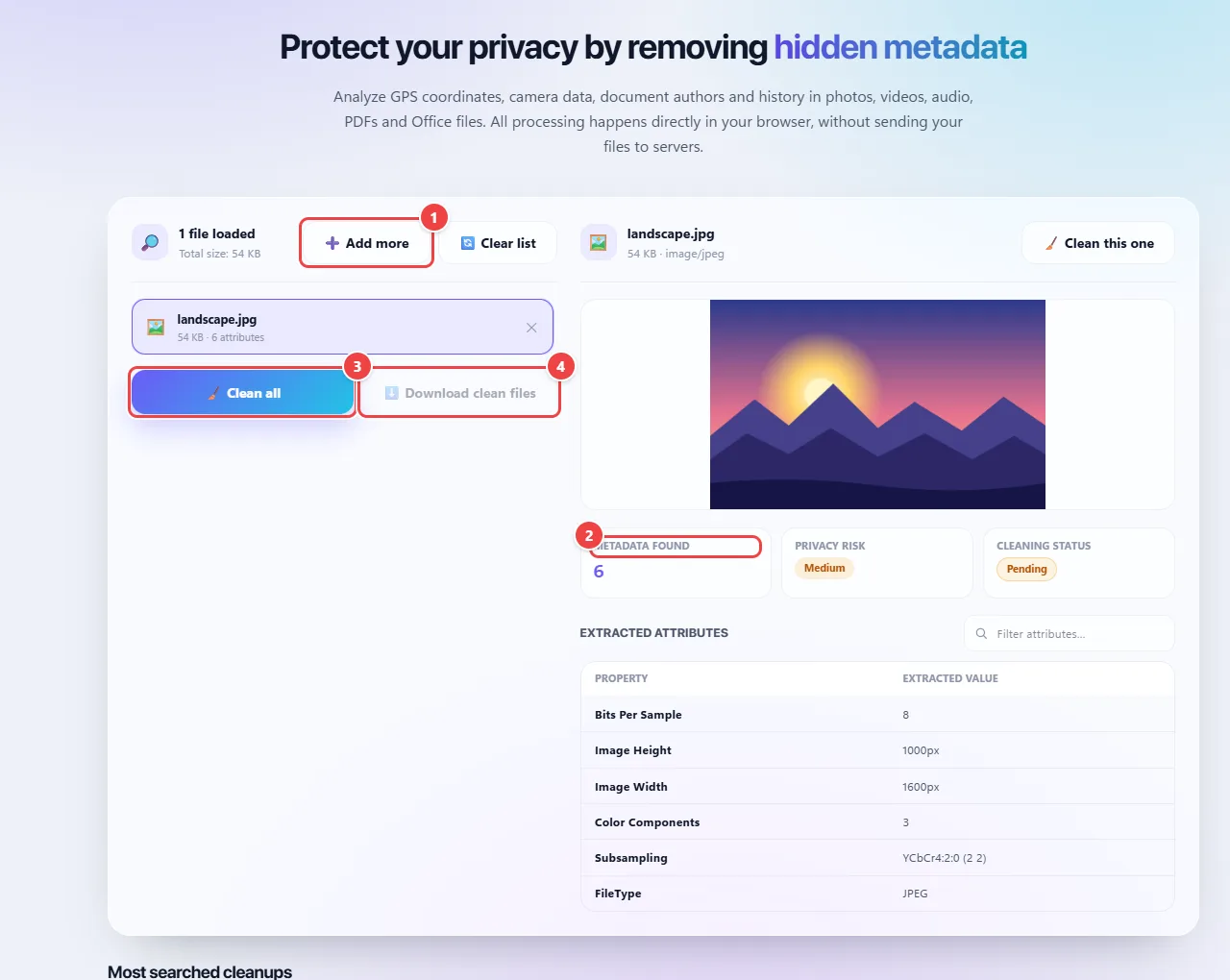
WebFaz Metadata Removal with a photo loaded, the number of metadata items found, the privacy risk, the cleaning status and the table of extracted attributes.
Metadata: what the file stores and the button to clean it.
  1. Point 1: Add photos, PDFs or Office files. The analysis happens in the browser.
  2. Point 2: See how much metadata the file has and the privacy risk (GPS, camera, author).
  3. Point 3: Clean removes the metadata and generates a clean copy.
  4. Point 4: Download the clean files. The original is not changed.

When to use it

  • Publishing a photo of a product, property or vehicle without revealing where it was taken.
  • Sending a résumé or contract as a PDF without the name of the author and of the program that generated it.
  • Sharing an Office document with a client without exposing who last edited it.

Tips

  • Check the metadata list before removing: it shows what the file really held.
  • Keep the original in a safe place. The clean copy is a new file; the original is not changed.
  • Remember that visible content is not handled: a face, a license plate or text inside the image are still there.

What happens in your browser

Images (JPG, PNG and WebP): the browser draws the photo on a canvas and exports it again. The canvas keeps only pixels, so EXIF (camera, date, GPS), XMP, IPTC and the ICC color profile do not follow the copy. Because it is a rewrite, JPG and WebP are re-encoded at 95% quality and may end up with a different file size.

PDF: the document’s information fields (title, author, subject, keywords, producer and creator) are emptied and the file is saved again, without changing the pages.

Word, Excel and PowerPoint (DOCX, XLSX, PPTX): these files are ZIP packages. The tool replaces the document’s properties file (author, last modified by, title, subject, description and keywords) with an empty version and removes the application’s statistics file.

All of this runs in JavaScript on your machine. You can open the browser’s network tab and check that no file is sent.
Read the full guide: real-world use cases, tips and limits →

Privacy: This tool runs entirely in your browser: your files and data are not sent to any WebFaz server. Learn more.

Perguntas frequentes

Why remove metadata?
Photos can carry the exact location where they were taken; documents can carry the author’s name and revisions.
Is the original file changed?
No, you download a new copy.
Which formats are accepted?
Images (JPG, PNG, WebP, HEIC/HEIF, AVIF, GIF and BMP), videos (MP4, MOV, MKV, WebM), audio (MP3, WAV, FLAC, M4A and others), PDF and Office documents (DOCX, XLSX and PPTX). The file comes back in the same format. TIFF and PSD are not accepted, because cleaning them would require saving in another format.
What do the High, Medium and Low risk levels mean?
It is a simple warning. High appears when there is a personal-data field with a real value (GPS, author, camera, software). Medium, when there are many fields without obvious personal data. Low, when there is almost nothing. Empty fields and those of the ICC color profile do not count as risk.
Can I clean several files at once?
Yes. You can upload several files and download the clean copies, one by one or in a single ZIP.