Every minute of your workday counts
Log your hours, track overtime and see the estimated value of your work.
Your history starts here
Fill in the times and save your first entry.
Balance = hours worked minus the daily target. Overtime is added up per day, with no automatic offset for missing time.
Your time, made clear
Log the start, the end and the break. For night work, mark that the shift ends the next day.
A transparent estimate
Value = regular hours × hourly rate + overtime × hourly rate with the premium you chose. It does not include taxes, night differentials or other pay components.
Your records stay with you
Entries are stored in this browser. Export the CSV to keep a copy; clearing the browser data erases your history.
About Hours Calculator
Helps you check your workday: hours worked, overtime and the monthly balance, with breaks deducted.
A practical example
You start at 8:00, leave for lunch at 12:00, come back at 13:00 and finish at 17:30. With the 1-hour break deducted, the day adds up to 8h30. If your target is 8 hours, the balance is +0h30. At the end of the month the calculator adds up the balance of every day and shows whether you have overtime or hours to make up.
How to use it
- Enter the start, end and break times for each day.
- See the total worked and the balance against your daily target.
- Follow the history month by month.
- Export to CSV for spreadsheets or for your employer or clients.
Limits and cautions
- Records are saved only in this browser; clearing the site data erases the history.
- It is a support calculator, not a replacement for your employer’s official time clock.
A ferramenta em uma imagem
Os pontos de clique estão numerados. Toque na imagem para vê-la em tamanho original. As demais telas, passo a passo, estão no guia “Como funciona”.
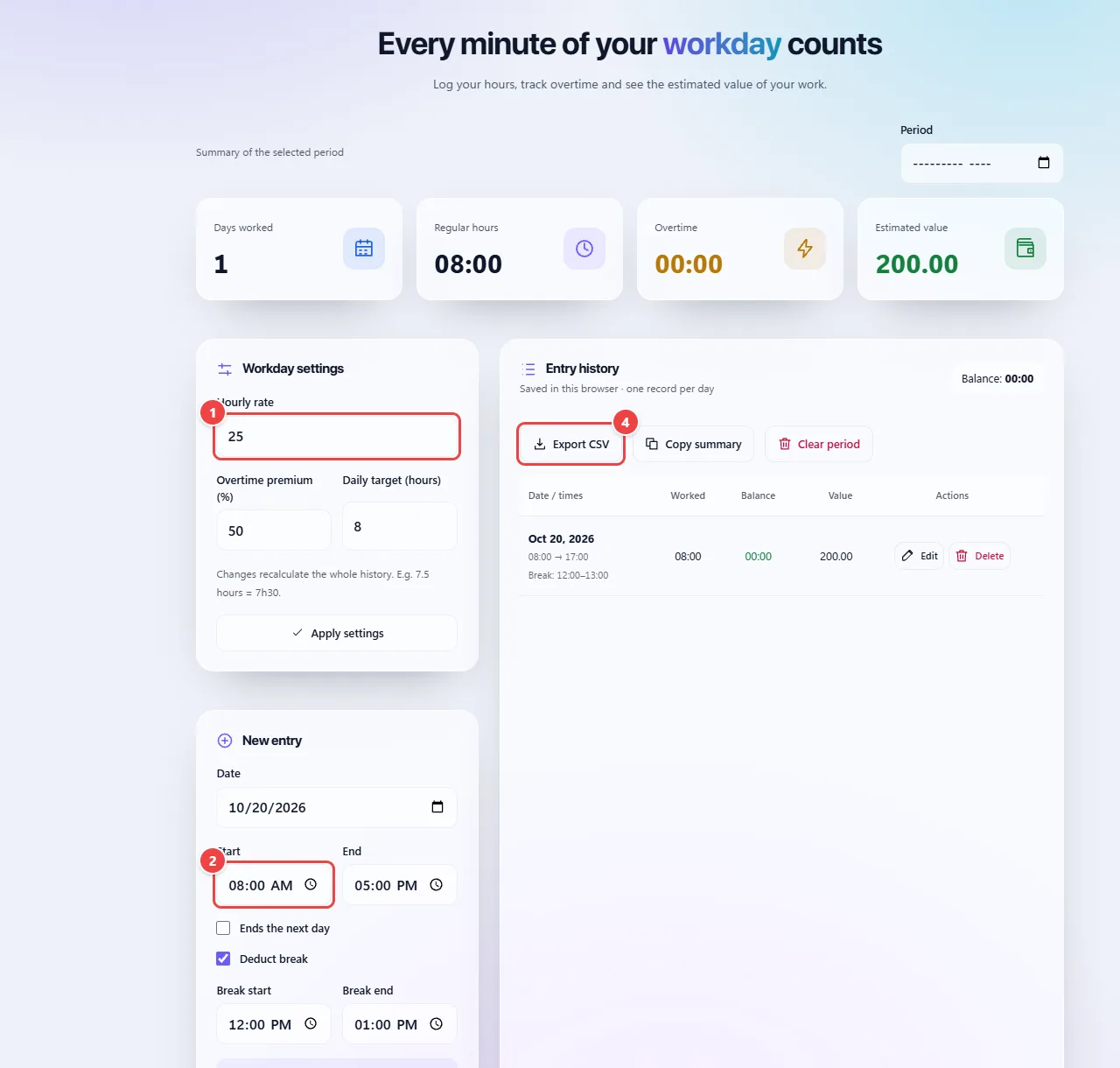
- Point 1: Enter the hourly rate, the overtime premium and the daily target.
- Point 2: Log the date, start, end and break of each day.
- Point 3: Save entry stores the day in this browser and updates the summary.
- Point 4: Export the period as CSV or copy the summary.
When to use it
- Checking your time bank for the month before closing your timesheet.
- Working out how much is left to complete your hours, or how much overtime you did.
- Freelancers and contractors who need to add up hours to bill clients.
Tips
- Log your hours on the same day; rebuilding the workday from memory at the end of the month usually leads to errors.
- Export the CSV when you close each month to keep a copy outside the browser.
- Check the rules in your contract and local labor law for overtime premiums and time banks.
What happens in your browser
Each day is calculated as the difference between the end and the start time, minus the breaks you entered. The balance compares the result with the daily target you set, and the monthly totals are the sum of the days.
Records are kept in the browser’s local storage, on this device. There is no account and no server, so they do not sync between devices and can be erased if you clear the site data.
The CSV export opens in spreadsheets such as Excel and Google Sheets, so you can keep a copy or send it to your employer or a client.
Read the full guide: real-world use cases, tips and limits →
Privacy: This tool runs entirely in your browser: your files and data are not sent to any WebFaz server. Learn more.
Perguntas frequentes
- Where are my records stored?
- In your browser’s local storage, on this device. Export the CSV if you want to keep a copy.
- Can I use it on another device?
- The data does not sync between devices; export and import manually if you need to.
- Does the calculator include an overtime premium?
- Yes, as an estimate: you set the hourly rate and the overtime premium (%), and the estimated value follows those numbers. The real premium depends on your contract and local labor rules, and taxes and other pay components are not included.
- Can I log shifts that cross midnight?
- Yes. Mark “Ends the next day” and check the total before relying on it.
- Can I recover my records if I clear the browser?
- No. That is why there is a CSV export: make a copy from time to time.
- Does it work as an official time clock?
- No. It is a support calculator for checking your own hours.
- Can I use it on my phone?
- Yes, the page adapts to small screens.