Online pattern and texture generator
Create continuous prints and textures from your images, shapes or ready-made templates. Choose how the block repeats, see the result live and download the image — or just the unit that joins without a seam.
Drag the element to move it · corners resize · the dot rotates (Shift = 15°) · drag the background to pan · wheel zooms
Build the block
Add images (drag, paste with Ctrl+V or choose files), colored shapes or texture templates. Move, rotate, resize and recolor each element on the layer you want.
Choose the repeat
Grid, brick, half drop, mirrored, 180° rotation or pinwheel — with adjustable offset and spacing between blocks. Use “Scatter copies” to create organic prints in one click.
Export and use
Download a large area already filled (up to 8192 px) or the seamless unit to use as background-repeat. You can even copy the ready-made CSS.
How do I create a seamless pattern online with WebFaz Patterns?
WebFaz Patterns is a free pattern and texture generator that runs in your browser: your images are not sent to any server. The pattern that appears when the page opens is a demonstration — edit it, erase it or click “Reset” to go back to it.
How to make a seamless pattern. Position elements inside the dashed block. Whatever crosses the edge continues automatically in the neighboring block, so the result closes without a seam. Prefer PNG or SVG with a transparent background: images with a solid background create visible squares.
Repeat modes. Grid repeats the block side by side. Brick and Half drop shift alternate rows or columns (you adjust the percentage). Mirrored reflects the block; 180° rotation turns neighboring blocks around; Pinwheel rotates in 90° steps (use a square block).
Export. “Repeated area” generates an image at the size you choose, as PNG, WEBP or JPG. “Seamless unit” generates only the smallest piece that repeats, ideal for CSS (background-repeat), Figma, textile printing and games — and the “Copy CSS” button already delivers the code with the image embedded.
Shortcuts. Arrow keys move the element (Shift moves 10 px), Ctrl+D duplicates, Delete removes, Ctrl+Z undoes and Ctrl+Shift+Z redoes. Drag the background to pan the view and use the mouse wheel to zoom.
Limits. Block from 40 to 1200 px; export up to 8192 px per side and 50 megapixels. To avoid freezes, very small templates with a very distant zoom limit the number of blocks drawn in the preview.
About Patterns
Creates continuous (seamless) patterns and textures by repeating images or shapes in different grids, for prints, websites and design.
What makes this pattern generator different
Built for textile printing and website backgrounds: the pattern repeats in ways that hide the repetition and also comes out as light CSS. The features that stand out:
Repeats that disguise the pattern
Beyond the simple grid, choose brick, half drop, mirrored, 180° rotation and pinwheel, with adjustable offset and spacing between blocks.
CSS for the repeatable unit
Copy CSS delivers the code that repeats only the unit as a background, which keeps the page light. The unit can be up to 1,600 px.
Large image or just the unit
Export an image already filled with the pattern (wallpaper, print) or just the unit, as PNG, JPG or WEBP.
Your own drawings in the pattern
Use your images, colored shapes and ten ready textures (fabric, brick, polka dots, stripes, tiles, honeycomb and others). With a transparent background, seams are less noticeable.
Visual editing with history
Drag, resize and rotate elements, check the result by switching between Block, Grid and Repeat, and use Undo, Redo and Reset.
A practical example
A designer wants a print background for a shop’s website. She uploads a leaf drawing, chooses the “half drop” repeat, adjusts the spacing and rotation and sees the continuous preview. She exports the image to use as a background and copies the ready CSS that repeats the unit.
How to use it
- Add an image or shape.
- Choose the repeat type (grid, brick, half drop, mirrored...).
- Adjust spacing, scale and rotation.
- Export the image or just the unit with ready CSS.
Limits and cautions
- Source images with irregular edges can leave visible seams.
A ferramenta em uma imagem
Os pontos de clique estão numerados. Toque na imagem para vê-la em tamanho original. As demais telas, passo a passo, estão no guia “Como funciona”.
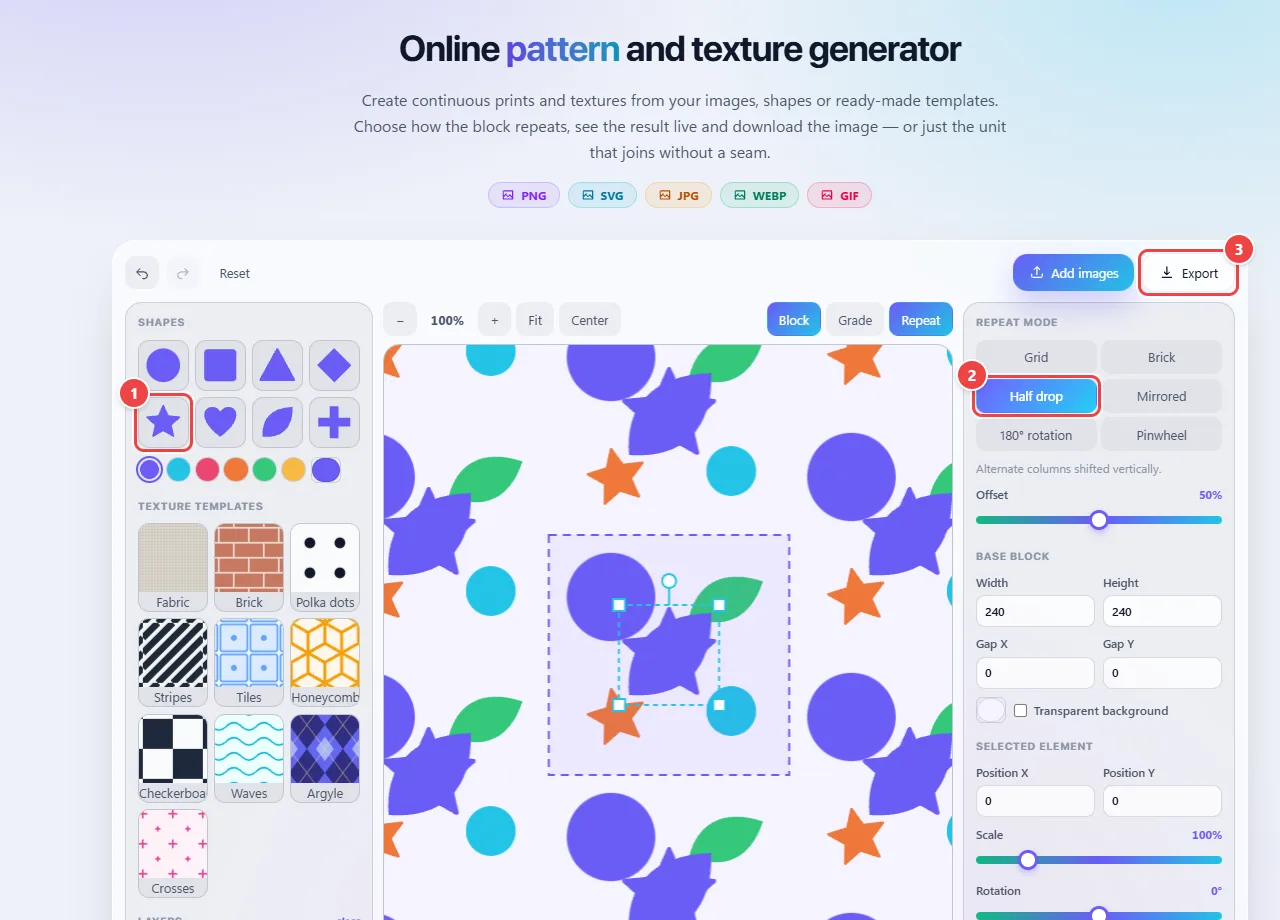
- Point 1: Add ready-made shapes and textures, or use “Add images” to upload your own.
- Point 2: Choose how the tile repeats: grid, brick, half drop, mirrored and others.
- Point 3: Export the pattern image or just the unit with ready CSS.
When to use it
- Creating a repeating background for a website or blog without making the page heavy.
- Building prints for fabrics, wallpapers and packaging.
- Testing how a drawing behaves when repeated, before taking it to the final product.
Tips
- Prefer source images with a transparent background: seams are less noticeable.
- Use spacing to give the elements room and avoid a “tight” pattern.
- Export only the unit with CSS when the destination is a web page: the file is much smaller than the full image.
What happens in your browser
A seamless pattern is a unit that, repeated in all directions, leaves no visible seams. The tool arranges copies of your image or shape in different grids: simple grid, brick, half drop, mirrored and others.
In half drop, each column is shifted down by half the unit’s height, which breaks the regularity and hides the repetition. In brick, the shift is horizontal, like the rows of a wall.
The preview and export are drawn in the browser. You can download the full image or only the unit with ready CSS (background-repeat), which keeps the page light.
Read the full guide: real-world use cases, tips and limits →
Privacy: This tool runs entirely in your browser: your files and data are not sent to any WebFaz server. Learn more.
Perguntas frequentes
- What is “half drop”?
- A pattern in which alternate columns are shifted by half the height, common in textile printing.
- Are my files uploaded?
- No, everything happens in the browser.
- Why do seams appear?
- Usually the edges of the source image are not continuous. Use an image with a transparent background or increase the spacing.
- Can I use the pattern on a website?
- Yes, the tool offers ready CSS to repeat the unit as a background.
- What is the ideal unit size?
- It depends on the use. On websites, small units (a few hundred pixels) are enough and light; for print, use more resolution.