Explore the drawing
Drag to move, zoom with the mouse wheel and use Fit to go back to the whole drawing.
Your DXF drawings are opened and converted in the browser, with no upload. Learn more
Open a 2D DXF, explore the layers and export the Model as an image or PDF.
The layers will appear here.
The export uses the visible layers and the whole drawing, regardless of the zoom.
Fitted to the page, with a 10 mm margin. Rasterized PDF, with no technical scale.
Drag to move, zoom with the mouse wheel and use Fit to go back to the whole drawing.
Hide what you do not want to include. SVG keeps the strokes as vectors; PNG and PDF use the chosen resolution.
2D ASCII DXF in the Model. Layouts, 3D solids, hatches, splines and CAD fonts are not reproduced faithfully. Export DWG to DXF before opening.
Views 2D DXF drawings, controls layers and converts to PDF, SVG or PNG without installing CAD software.
Open and share a technical drawing without CAD software installed. The features that stand out:
Open the drawing and export it in the format the recipient uses. The file does not leave your device.
The file’s layer list lets you hide dimensions, axes and borders to export only what matters.
From A4 to A0, in landscape or portrait, with the drawing centered on the page.
Choose between keeping the layers’ colors or exporting in black and white, with a dark or white background.
SVG does not lose definition when enlarged; the PNG comes out at the resolution (width in pixels) you choose.
Zoom in, pan, fit the whole drawing and turn on the grid.
A client sends the drawing of a part as a DXF and you do not have CAD software on your computer. You drag the file onto the page, turn off the dimensions layer to see only the outline, zoom in on a hole and export a landscape A4 PDF to attach to the quote. Nothing was installed and the drawing never left your device.
Os pontos de clique estão numerados. Toque na imagem para vê-la em tamanho original. As demais telas, passo a passo, estão no guia “Como funciona”.
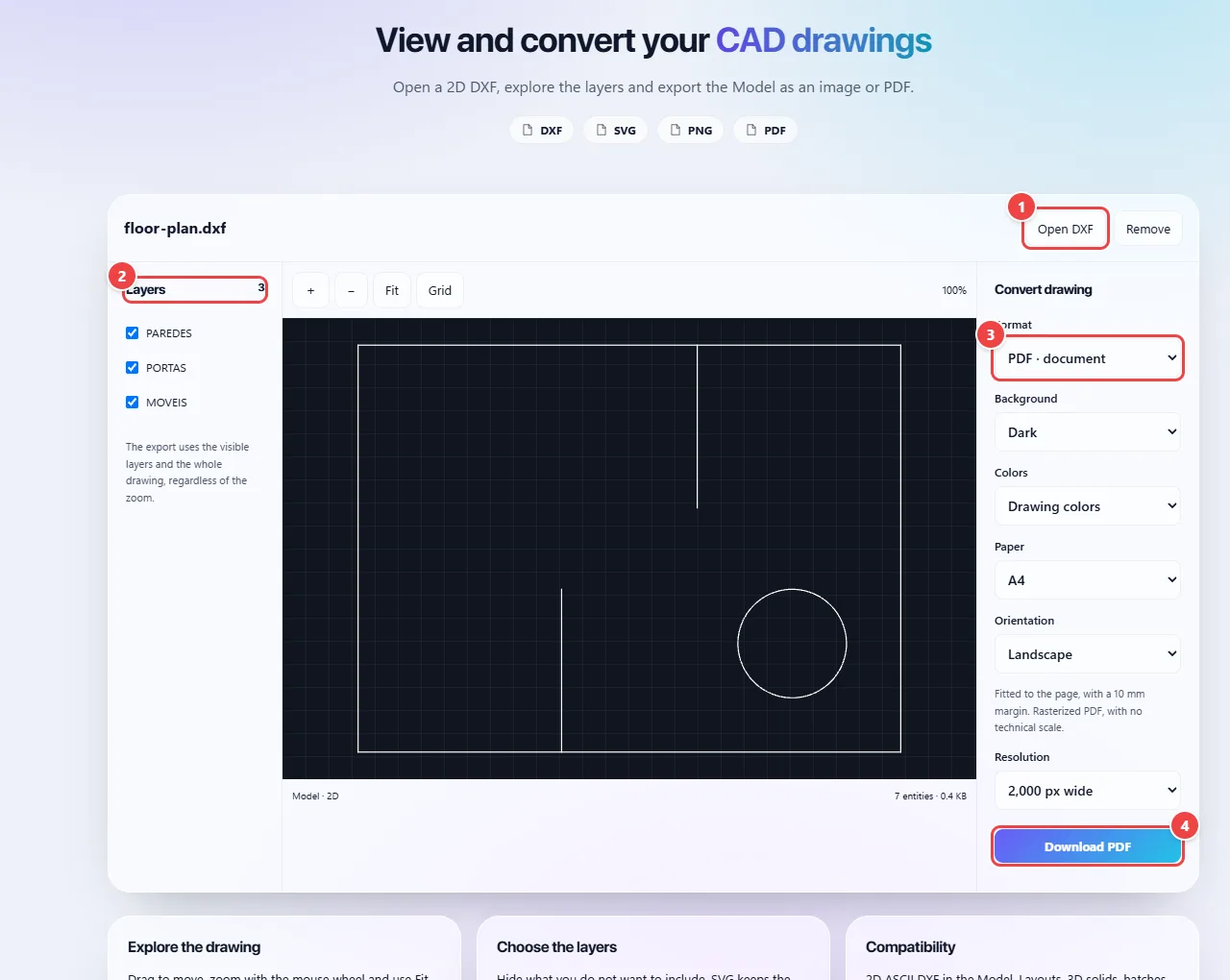
The DXF (ASCII format, up to 20 MB) is read in the browser and converted into an SVG drawing. The entities interpreted are lines, polylines, circles, arcs, ellipses, text, points, solids and inserted blocks (INSERT). Entities outside that list are not displayed, and the tool warns you when that happens.
The file’s layers become a list with on/off switches. Navigation is done with the mouse wheel for zoom and dragging to pan.
SVG export comes straight from the drawing. PNG and PDF are generated from an image drawn in the browser at the chosen resolution; for PDF you set the paper size and orientation, and the drawing is centered on the page.
Read the full guide: real-world use cases, tips and limits →
Privacy: This tool runs entirely in your browser: your files and data are not sent to any WebFaz server. Learn more.